Network blocking
58,619 block rules over 144,151 named domains — images, scripts, frames and XHR alike. The request never leaves the browser, so the ad never bills anyone.
See every ad die, in real time. Ad Blocker Pro cuts ads, trackers, pop-ups and redirects out of the sites you actually use — and counts each one as it happens. Open the popup and watch the number climb.
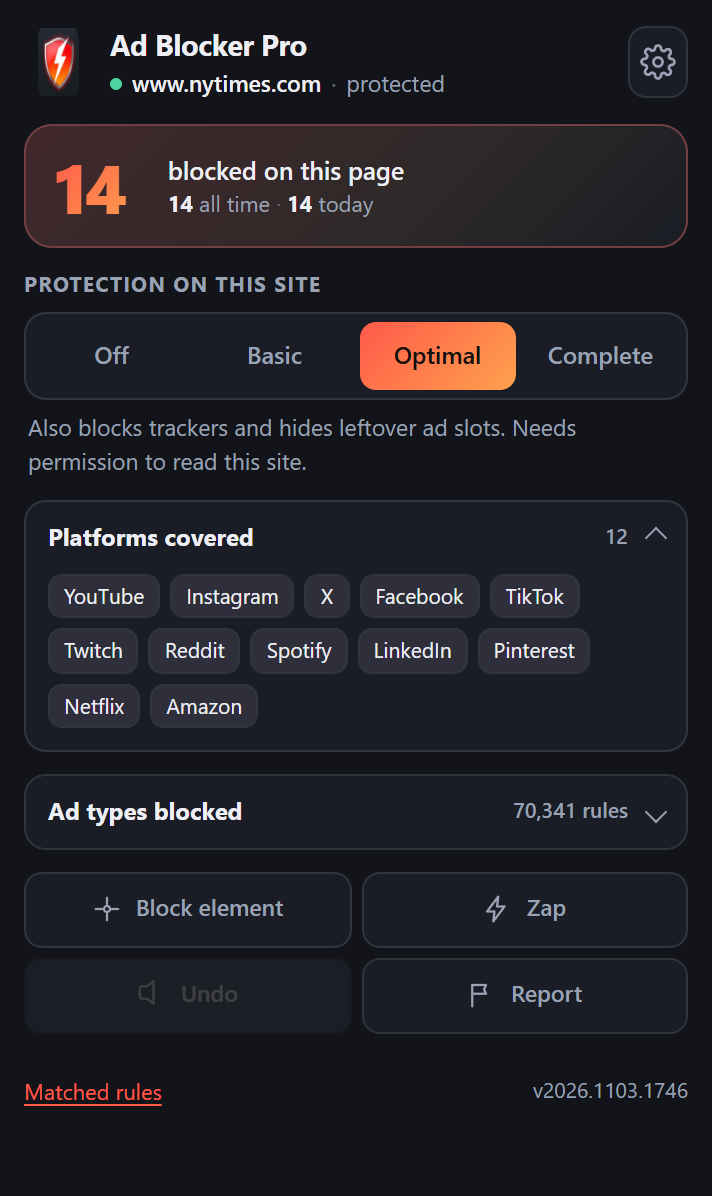
Network rules stop the request. Cosmetic rules remove the hole it left. Redirect rules feed the page a harmless stub instead of a tracking script. All three run before the page paints.
58,619 block rules over 144,151 named domains — images, scripts, frames and XHR alike. The request never leaves the browser, so the ad never bills anyone.
3,873 redirect rules neutralise tracking scripts and 1,101 strict-block rules shut down the tab-grabbers before they open.
When a slot is already in the markup, it is removed instead of left as a grey box. Cookie walls and newsletter overlays go too.
A real tally, not a marketing number. Watch it move while a page loads, and see the all-time total across every site.
Four levels — Off, Basic, Optimal, Complete. Start at Optimal; drop a site to Basic when a player refuses to stream.
No account, no analytics, no remote config. Filter lists ship inside the extension; counters live in local storage.
These figures come from the rulesets compiled into this build — 56 filter lists, 70,341 rules, 144,151 domains. Nothing here is estimated.
Each number is how many rules in this build name that platform's own domains directly — a floor, not a ceiling, because list-wide patterns match millions of hosts without naming them.
| List | Region | Rules |
|---|---|---|
| RU AdList | Russia, Ukraine, Belarus, Kazakhstan | 6,012 |
| AdGuard Chinese | China, Taiwan | 5,944 |
| IndianList | India, Sri Lanka, Nepal | 5,363 |
| AdGuard Français | France, Belgium, Canada | 4,052 |
| ABPindo | Indonesia, Malaysia | 3,264 |
| EasyList Germany | Germany, Austria, Switzerland | 1,833 |
| AdGuard Japanese | Japan | 1,565 |
| AdGuard Ukrainian | Ukraine | 1,463 |
| Frellwit's Swedish | Sweden | 1,455 |
| AdGuard Turkish | Türkiye | 1,361 |
Swipe the table sideways to see every column.
46 further regional and special-purpose lists are included and can be switched on per region from the dashboard — 56 lists in total.
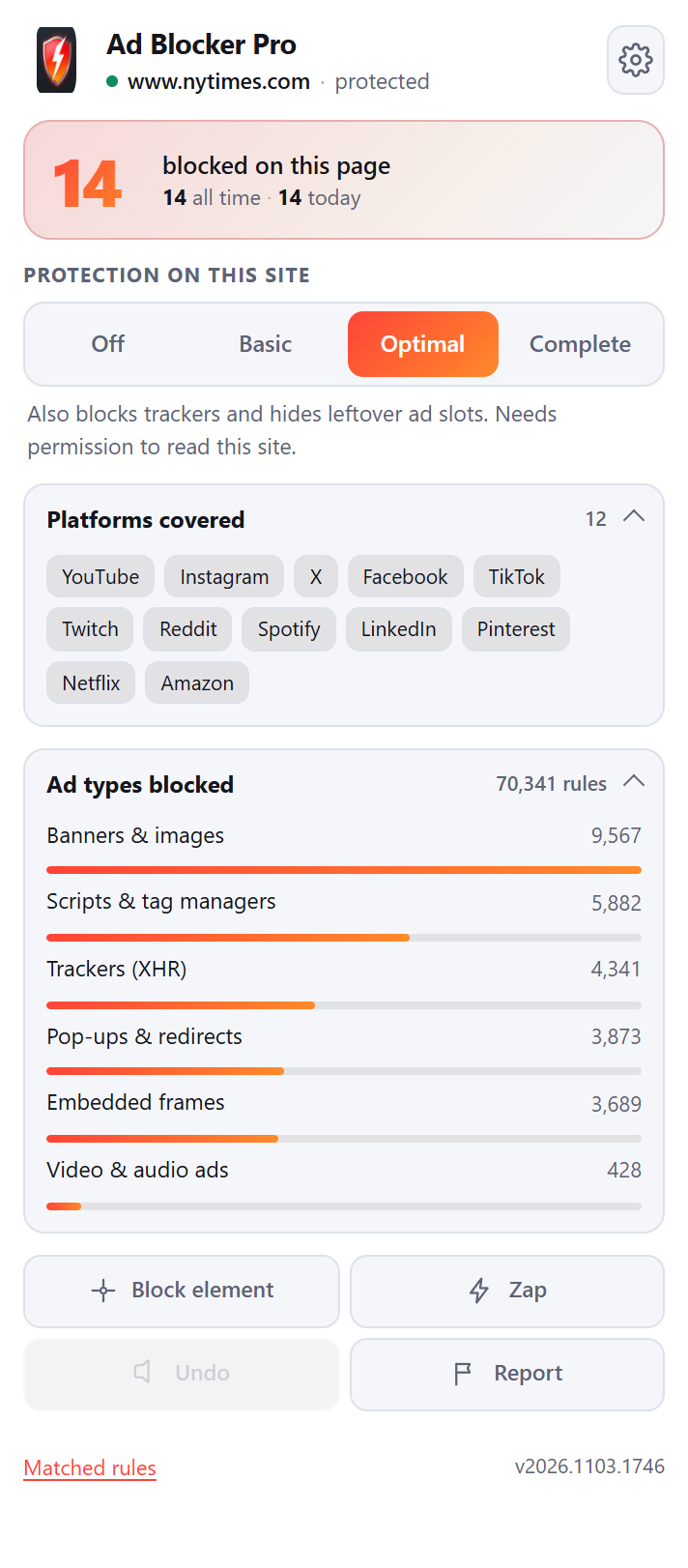
Rules per resource type, plus the annoyance categories that make a page unreadable. Counted from the compiled rulesets inside this build — every rule is inspectable, nothing is hidden behind a black box.
| Ad type | What happens to it | Rules |
|---|---|---|
| Display banners | Image request blocked; container collapsed | 9,567 |
| Ad & analytics scripts | Blocked, or served a no-op stub so the page's own code does not throw | 5,882 |
| Trackers (XHR / beacon) | Request killed before it leaves | 4,341 |
| Pop-ups & redirects | Redirect rule plus strict-block tab suppression | 3,873 |
| Embedded ad frames | Iframe never resolves | 3,689 |
| Cookie consent walls | Overlay removed and page scroll restored | 1,839 |
| Social & chat widgets | Widget element deleted from the DOM | 597 |
| Video & audio ads | Media segment blocked or skipped | 428 |
| Newsletter overlays | Overlay removed | 334 |
| Push-notification prompts | Prompt element removed | 291 |
| Malware & scam hosts | Domain blocked outright | 433 |
| Header-based tracking | Tracking parameters stripped from requests | 132 |
Swipe the table sideways to see every column.
7,717 exception rules keep the blocklist from breaking logins, checkouts and video players.
A request hits the browser. Before any network traffic is created, the declarative rules engine asks the extension what to do with it — block, redirect, upgrade, or let it through. That decision costs microseconds because it happens in the browser process, not in JavaScript.
The request never exists, so nothing to unload later.
Injected CSS hides or removes the leftover shell.
Page scripts that detect blockers get neutralised replies.
A payment or login flow always wins over a block rule.
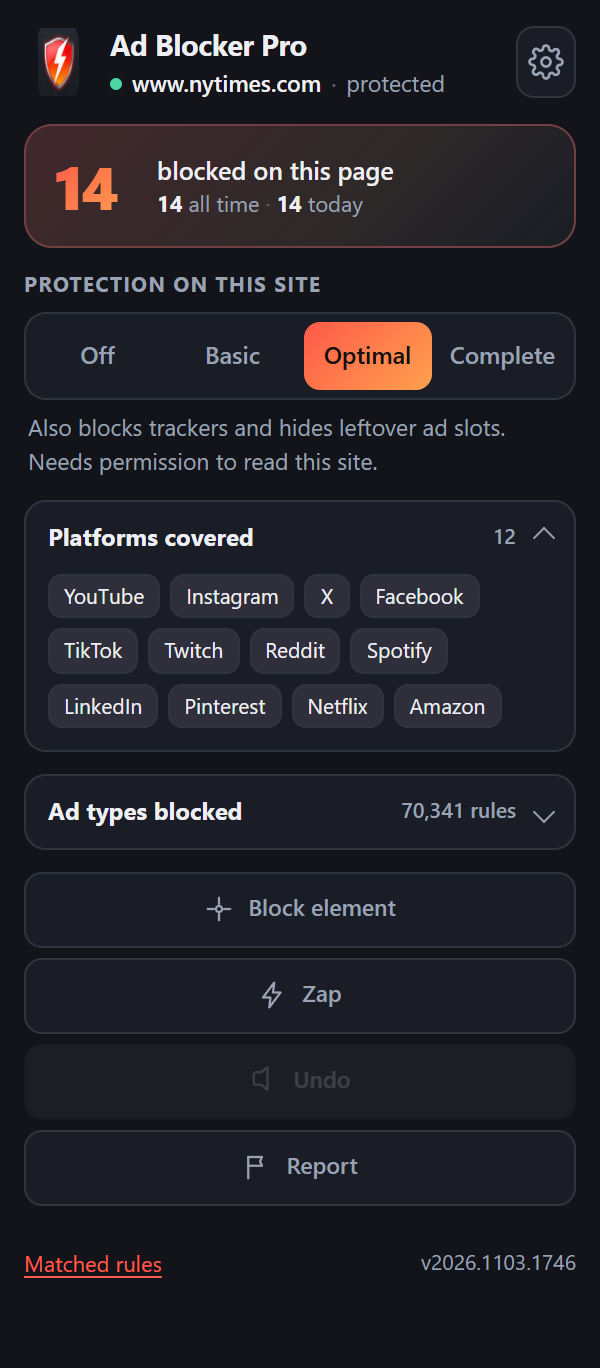
Most blockers show a rounded-up figure they invented. Ad Blocker Pro reads the browser's own rule-match events, so the count is the count. Switch a site off and it stops moving.
Per page, per site, all-time and today.
Images, scripts, frames and trackers are counted separately.
Cleared when you clear the extension, never transmitted anywhere.
Ad Blocker Pro is a Manifest V3 extension that runs from a folder on your disk. Your browser checks that folder on every start, so the install survives restarts.
Zip is about 20 MB — filter lists are bundled, so nothing is fetched at runtime.
Not the Downloads folder — pick a path you will not tidy away later, e.g.
D:\Apps\AdBlockerPro. Moving or deleting this folder uninstalls the extension.
Chrome, Brave, Opera: chrome://extensions
Edge: edge://extensions
Chrome: top-right toggle. Edge: left sidebar, bottom. Torch icon appears once it is on.
Select the folder that contains manifest.json — usually the unzipped
uBOLite.chromium directory itself, not its parent.
Click the puzzle-piece icon in the toolbar and pin Ad Blocker Pro. Open any news site — the popup should already show a number above zero.
Open a page → click the icon → "blocked on this page" should be counting
--load-extension command-line switch, so scripts
and launchers that use it silently do nothing. Loading through the extensions page UI still works and is
the only supported path.chrome://policy.
If ExtensionInstallBlocklist is set to *, no unpacked build will load and the
browser's policy has to change first.about:debugging. Permanent Firefox installs need a signed package, which this site does not
distribute yet.Send the browser version, the exact message, and the folder you selected — that is usually enough to diagnose it.
Every site starts at Optimal: network rules plus specific cosmetic filtering. That covers nearly everything. Move a site to Complete for generic element hiding when an ad slot survives, or down to Basic when a video player sulks.
Levels 2 and 3 ask for permission to read that one site — nothing broader.
Custom picks from the "Block element" tool are stored locally as your own filters.
Undo removes your last custom filter without touching the shared lists.
declarativeNetRequestFeedback permission. Ad Blocker Pro listens to those events and
increments a tally per tab, per site and overall. It counts rules that actually fired — not a
prediction, not a rounded estimate.abpStats (the tally), the per-hostname
protection levels, and any custom filters you create with the element picker. There is no sync, no
account, and no code path that sends them anywhere.declarativeNetRequest: Chrome 122+, Edge, Brave, Opera, Vivaldi. Firefox can load it
temporarily for testing, but permanent installs need a signed package.If a page breaks, the fastest fix is telling us which page and which level you were on.
There is no ticket system and no chatbot. Pick the address that matches your reason for writing, and include the details listed beside it — that is what makes a reply possible.
All three documents in full. Each is dated 3 November 2026.
Ad Blocker Pro has no server, no account system and no analytics. This section exists to say that precisely rather than to promise it vaguely.
Nothing. The extension contains no telemetry, no crash reporting, no remote configuration and no advertising identifier. It never contacts a first-party endpoint, because none exists. Filter lists are compiled into the package at build time; the extension does not download updates on its own.
All of it lives in your browser profile and is visible to anyone with access to that profile. None of it is transmitted. Removing the extension removes the data with it.
This site is static HTML. It sets no cookies, loads no third-party scripts, embeds no fonts from a CDN, and contains no tracking pixels. Standard server logs from the hosting provider may exist for security purposes; they are not combined with anything else.
The extension is not directed at children and collects no data from anyone of any age.
If this notice changes, the date above changes with it. Because there is no contact list or account, there is no notification channel — the current text is the accurate one.
Questions about this notice: privacy@toolshub4u.com.
By installing or using Ad Blocker Pro you accept these terms. If you do not accept them, do not install it.
A free browser extension, distributed on an "as is" basis, that filters network requests and page elements according to community-maintained filter lists. It is not a security product, not a VPN, not an antivirus, and it does not guarantee that no advertisement will ever appear.
The extension is provided without warranty of any kind, express or implied, including merchantability, fitness for a particular purpose and non-infringement. The authors are not liable for any loss arising from its use, including — but not limited to — a site that stops working, a discount code that fails to apply, or content that is blocked in error.
Blocking data comes from third-party lists (uBlock Origin's own lists, EasyList, EasyPrivacy, Peter Lowe's list, URLhaus and regional lists). Those lists are maintained by their own communities under their own licences, and their accuracy is outside our control.
There is no auto-update service. New builds are published as packages you download and install yourself. No availability guarantee is made for this website or the download.
These terms may be revised. The date above reflects the current version.
Ad Blocker Pro is a modified build of uBlock Origin Lite, copyright © Raymond Hill and contributors, released under the GNU General Public License v3. The filter engine, rulesets and dashboard are his work. The name, icon, popup interface and block counter are modifications made for this distribution.
declarativeNetRequest.onRuleMatchedDebug and persisting a local tally.Nothing in the filtering engine, rule compiler or declarative rule sets was altered.
You may run this software for any purpose, study it, modify it and redistribute copies — on the condition that redistributed versions remain under the GPLv3 and that the corresponding source is made available. Because this is a modified build, the complete corresponding source is available on request from source@toolshub4u.com.
Blocking data is compiled from lists maintained by their own communities, including uBlock Origin's lists, EasyList, EasyPrivacy, Peter Lowe's ad-server list, URLhaus, AdGuard's public filters, and regional lists. Each list carries its own licence and attribution terms.
Platform names used on this site — YouTube, Instagram, X, Facebook, TikTok, Twitch, Reddit, Spotify, LinkedIn, Pinterest, Netflix, Amazon — are trademarks of their respective owners. Their use here is descriptive: it identifies the sites the filter lists cover. No affiliation or endorsement is implied.
If you want the unmodified original, use it: github.com/gorhill/uBlock.
Install in under a minute, then open any news site and watch the counter climb.
A content blocker that shows its work. Built on the filter lists the community maintains.